Introduction
For many businesses, the Google Business Profile (GBP) is their first point of contact with potential customers.
Before a customer finds your website, fills out a form, makes a phone call, or walks into your establishment, they will have seen and evaluated your Google Business Profile directly in search or Maps results.
Because of this, your Google Business Profile isn’t just a digital listing anymore.
It is a:
- Local SEO tool
- Conversion machine
- Signal of credibility
- Platform for customer engagement
- Lead generation tool
- Digital storefront
What most businesses do is set up a Google Business Profile, input basic details and then call it a day.
But optimisation is an ongoing task.
Google has begun to place more emphasis on business profiles that have accurate information, active engagement, useful content, and a positive user experience.
This guide explains the entire Google Business Profile optimisation process, from setup to growth.
Understanding How Google Business Profile is Key to Local Search
Google Business Profile’s impact on the local search ecosystem can’t be understated.
When you search for:
- “Dentist near me”
- “Packaging company in Bangalore”
- “Digital marketing agency nearby”
- “Restaurant near me”
Google assesses several signals before ranking the best local businesses in the following:
- Local Pack
- Google Maps
- Local search listings
- Knowledge Panels
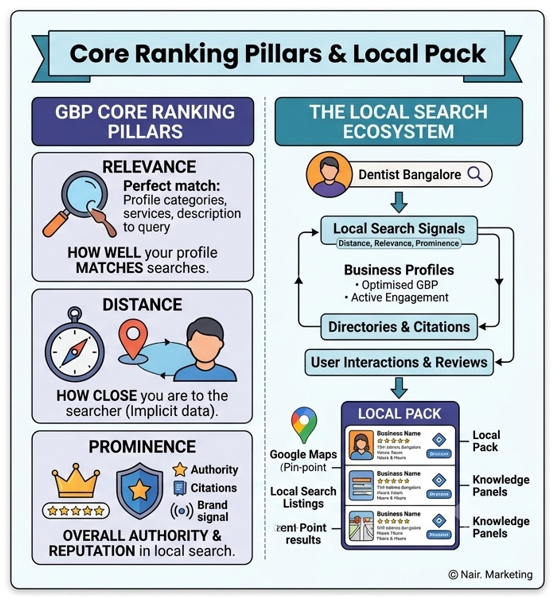
When analysing these, Google essentially breaks the evaluation into 3 categories:
Relevance
How well your profile matches a customer’s search query. Google looks at:
- Business categories
- Services
- Products
- Description
- Keywords
- Website content
- User interactions
The more complete and accurate your profile, the better Google can understand what you do.
Distance
How close a business is to the searcher.
You cannot directly control this, but the accuracy of geographic data makes your local SEO efforts that much stronger.
Prominence
Overall authority and reputation of the business, especially within local search. Google analyses:
- Reviews
- Ratings
- Authority of your website
- Local citations
- User engagement
- Mentions on the web
- Brand signals
Your Google Business Profile optimisation plays a big part in this category.
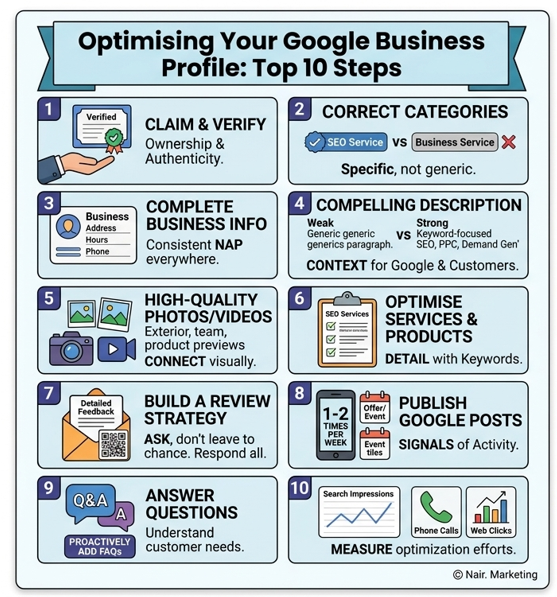
Step 1: Claim and Verify Your Profile
The very first step of any Google Business Profile optimisation is to claim and verify your profile. There are a few verification methods you might be assigned, such as:
- Postcard verification
- Phone verification
- Email verification
- Video verification
- Search Console verification
Failure to verify your profile:
- limits the information that can be displayed
- restricts the editing functionality
- erodes user trust
- significantly hampers visibility opportunities
Verifying your Google Business Profile claims ownership and adds authenticity.
Step 2: Choose the Correct Primary and Secondary Categories
Your category is one of the strongest ranking factors on Google Business Profile, and many businesses don’t optimise it.
The chosen category should accurately reflect what your business offers and your primary product or service.
Good:
Primary Category:
Digital Marketing Agency
Secondary Category:
- SEO Service
- Advertising Agency
- Marketing Consultant
Bad:
Primary Category:
Business Service
Using broad categories like this will make your profile seem less relevant to users searching for a specific service.
Categories Best Practices:
Only Pick One Highly Accurate Primary Category:
You can only select one primary category for your business. Be precise. Don’t just go with a general category like “Business Service” to seem “bigger”. Specificity usually gets better results.
Select Relevant Secondary Categories:
Secondary categories are additional ways to tell Google about services that your business provides beyond its primary category. These allow you to reach users looking for related, but more specific services.
Keep in mind that while useful, you shouldn’t stuff these; only pick categories relevant to your business’s actual offerings.
Research Competitors’ Categories:
When looking at the map, you can often see what category or categories other local businesses like yours use. This can give you ideas for relevant categories you may not have considered.
Step 3: Completely Optimise Business Information
An incomplete Google Business Profile is a red flag for customers and weakens your relevance signals. Complete every applicable section. This includes:
- Business name
- Address
- Phone number
- Website
- Operating hours
- Holiday hours
- Services
- Products
- Business attributes
- Appointment links
- Service areas
Consistency is Key for Local SEO
Your NAP should remain the same everywhere. NAP stands for Name, Address, Phone Number. Any slight variation across your website, directories, and social media could affect your local rankings and trust signals.
Example:
Incorrect:
- ABC Marketing Pvt Ltd
- ABC Marketing Private Limited
- ABC Marketing Solutions
Correct:
Only use one variation across the internet.
Step 4: Craft a Compelling Business Description
Your business description gives Google and customers more context about what your business is and what it offers. Too many businesses write a vague and unhelpful description.
Weak example:
“We are the best digital marketing company providing quality services.”
Strong example:
“XYZ Digital offers targeted SEO, pay-per-click (PPC), content marketing and demand generation services to help B2B and B2C organisations improve online visibility, drive qualified leads and grow their business.”
Description Best Practices:
Include your primary services, specialisation, target audience, and unique selling propositions. If your business focuses on a specific geographical area, include it.
Avoid keyword stuffing, promotional language, all caps, or unsupported claims.
Step 5: Add High-Quality Photos and Videos
A business profile with great photos and videos performs better. It helps potential customers connect with your business and can lead to more clicks, direction requests, better engagement, and increased trust.
Include:
- Exterior Photos
- Interior Photos
- Team Photos
- Product Photos
- Service Process Photos
- Videos
Videos can be used to give virtual tours of your business, introduce your team, or showcase how your products or services work.
Photos and Video Best Practices:
- Use high-resolution images.
- Keep branding consistent with your overall business image.
- Ensure all images and videos represent your actual business and offerings accurately.
- Avoid stock photos and excessive filters.
Step 6: Optimise Your Services and Products
Leaving the services and products sections blank is a missed opportunity. Fill these sections with detailed descriptions that include keywords.
Example for services:
SEO Services
“Comprehensive SEO services including technical audits, content strategy, keyword research, on-page optimisation, and authority development.”
Step 7: Build a Review Strategy
Reviews are critical to the trust and ranking of a Google Business Profile. Positive reviews boost your profile’s credibility, attract more customers, and improve local search ranking. Negative reviews, if handled properly, can be seen as a sign that a business is engaged and responsive.
Encourage Reviews Consistently
Don’t leave reviews up to chance. Create processes for requesting reviews:
- Email follow-ups
- SMS requests
- QR codes
- In-person requests after a service
Review Best Practices:
- Ask for detailed feedback about specific service aspects.
- Don’t incentivise reviews, and don’t ever use fake reviews.
- Avoid buying fake reviews, as Google’s algorithm can detect these and penalise your profile.
- Respond to all reviews. This shows your business is engaged and cares about customer feedback.
Step 8: Publish Google Posts Regularly
Google Posts are a way to share updates, offers, events, and news directly from your profile. Regularly posting signals that your business is active and provides up-to-date information, which Google rewards.
Include:
- Clear headlines
- Images
- Call-to-action buttons
- Relevant information
Recommended posting frequency: 1-2 times per week.
Step 9: Answer Questions
This section is often overlooked, but it can be a valuable source of information for potential customers and can help Google understand what your customers are looking for. Proactively add frequently asked questions with clear answers.
This can cover:
- Pricing
- Operating hours
- Service areas
- Appointment procedures
Step 10: Track Your Performance with Insights
Google Business Profile offers an insights section that will help you measure your optimisation efforts.
Track metrics like:
- Search impressions
- Discovery vs. Direct searches
- Phone calls
- Website clicks
- Direction requests
- Messaging interactions
- Photo views
Use this data to identify what’s working and what needs adjustment.
Common Google Business Profile Mistakes to Avoid:
- Keyword-stuffing your business name.
- Inconsistent NAP information.
- Ignoring or failing to respond to reviews.
- Using poor-quality photos and videos.
- Leaving important fields blank.
- Choosing the wrong business categories.
- Not posting Google Posts or updating your profile regularly.
And Lastly
Optimising your Google Business Profile is no longer a “set it and forget it” task; it’s an ongoing local marketing strategy that can bring a significant competitive advantage to your business.
Businesses that consistently optimise their Google Business Profile will benefit from:
- Improved local search visibility
- Enhanced brand trust
- Higher user engagement
- More leads
- Increased conversion rates
Because when it comes down to it, local SEO isn’t just about being discoverable; it’s about building trust and confidence before your potential customers even find your website.